

Nutrition + strength. One connected plan.

Good effort.
A smarter plan.

Track your food. Train with purpose. Understand your week. Macro Trainer is your nutrition and strength coach, turning everyday logs into useful next steps.

Your progress. Your privacy.

  • No subscriptions
  • No ads
  • No account required

Private by design. Works offline after setup.

14 days free. Then $59.99 once.

Macro Trainer's Today screen on an Android phone: 1,463 kcal left of a 2,000 kcal goal, protein, carbs and fat against targets, a Log food button, a protein note from Coach Eisley and today's Upper Body session
Your day. Your next step.
A stronger everyday.iPhone · iPad · Android · Mac · Windows · Linux

Make your logs work for you

Food and training belong
in the same conversation.

  1. 01

    Start with your goal.

    Cut, bulk or recomp. Get calorie and macro targets, and a training plan that fits.

  2. 02

    Show up. Log your day.

    Meals, lifts and weigh-ins, all in one place. Start simple, or track the details that matter to you.

  3. 03

    Choose your next step.

    Review your week, see what’s working, and decide which coaching suggestions to apply.

01 / Food, without the friction

Log any meal in seconds

Search, scan, snap or describe it. The food database is stored on your device, so you can search even with no signal at the gym or the grocery store.

Explore meal logging
  • Snap your plate: the coach identifies each food and estimates portions for you to confirm. Photo recognition happens entirely on your device.
  • Start with a recipe: photograph a recipe card or ingredients list — photo logging can recognize the ingredient names, too. Check the food matches and set quantities for your serving before logging.
  • Describe a meal: type or say what you ate, like "two eggs, sourdough toast with butter, black coffee", and the coach turns it into foods and portions for you to check.
  • An offline food catalog: search foods and portions without a connection.
  • Point and scan: scan a barcode or a nutrition label on iPhone, iPad, and Android.
  • Repeat a meal: reuse a past meal without re-entering it, or plan ahead.
  • Start simple or go deep: count calories only, jot quick macros or track full macros. The coach works with whatever you track.

Photo logging needs optional AI setup and model downloads. Support and download sizes depend on your device — see AI requirements. Optional backups can include photos.

Looks right? review after logging from a photo: white rice seen as 0.75 cup, 181 kcal, and grilled chicken breast seen as 0.75 piece, 222 kcal, each with Edit amount and Change food, a collapsed Meal photos row, a 403 kcal total and a Log meal button

02 / Train with purpose

Built for the gym floor

Focus on nutrition, workouts or both. When you train, Macro Trainer plans your sessions and pairs them with your daily targets.

Explore training tools
  • Plans for every level: start with foundational strength or two-day total-body routines, or run classic upper/lower splits, push-pull-legs, and 5/3/1 barbell programs.
  • Easy to follow in the gym: big buttons for logging sets, an automatic rest timer, and clear set and rep targets for every exercise. The workout screen stays dark in either theme.
  • Life happens: miss a workout and your plan shifts so you can pick up where you left off.
  • Strength & volume trends: watch the weights you lift and your weekly workload climb over time.
Bench Press in an Upper Body workout after logging the first set: set 1 done at 175 lbs for 6 reps, the rest timer counting down with Skip Rest, a Log set 2 button and Barbell Row up next

03 / Understand your week

A coach that pays attention

Macro Trainer watches your weight trend, training and recovery. It sends you a note when you're on a streak, and another when you're starting to stall.

Explore weekly coaching
  • Your weekly review: summarizes your logged meals and training each week, with plain-language notes on what to work on next.
  • Plateau fixes: when your logged history supports a change, the coach can suggest new calorie or macro targets for you to review before applying.
  • Recovery weeks & refeeds: when workouts start feeling heavy, it suggests a deload week, and you decide whether to take it. On a long diet, it can plan a higher-calorie refeed day.
  • Notes in one place: new insights wait under From your coach on the Coach tab, next to the chat.
  • Supportive check-ins: stop logging and your coach reaches out with encouragement, not a guilt trip.
The Coach tab with Coach Eisley: on-device AI in beta, one new insight under From your coach, suggested questions and a message box

More than the daily numbers

Built around your everyday.

Your progress

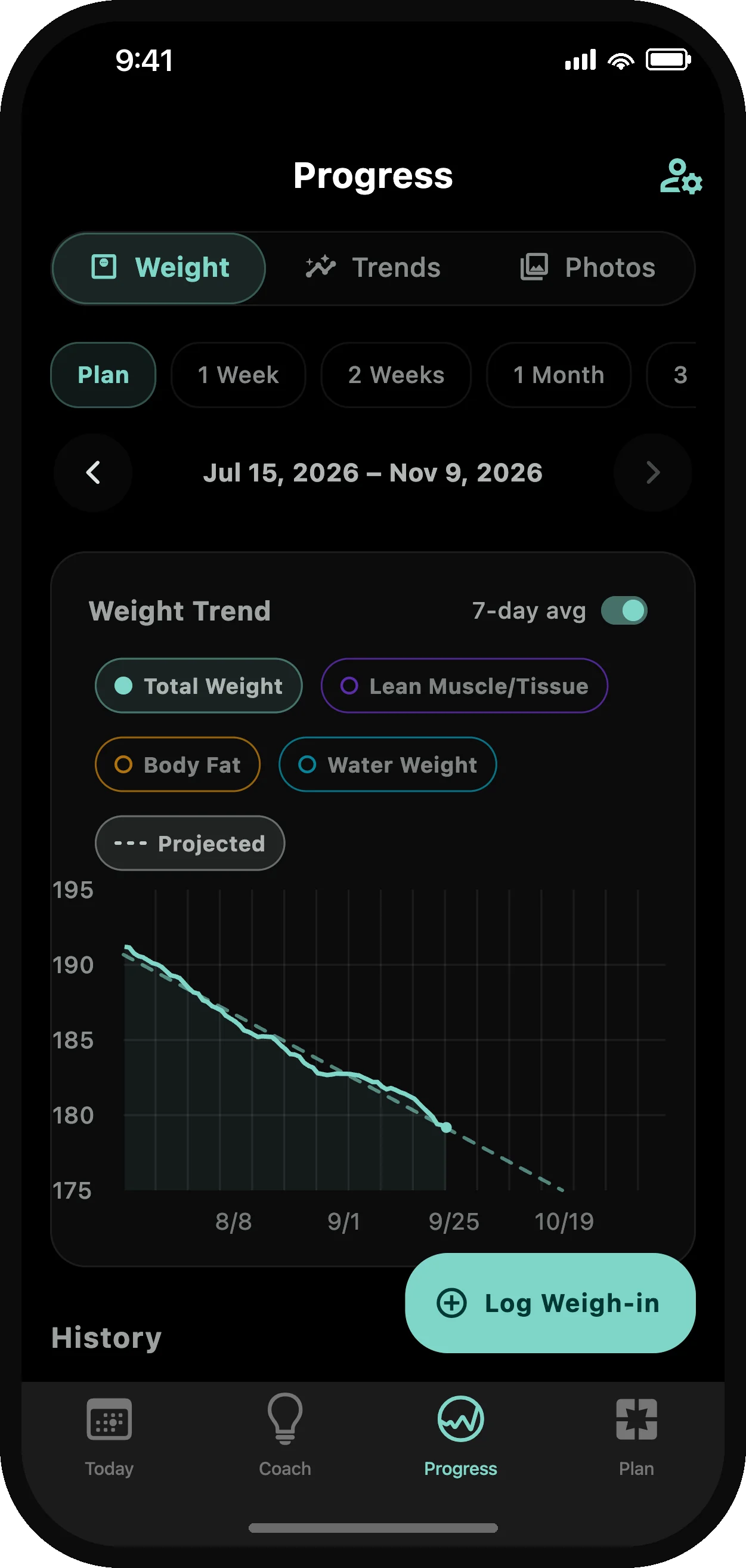
See where your weight is heading

Macro Trainer turns your daily weigh-ins into one clear line and sets it beside how closely you stuck to the plan.
Explore progress tracking
  • Your trend: a 7-day average that smooths out daily swings, so you see the direction instead of the noise.
  • Body composition: lean mass, body fat, and water — one tap away when you want the detail.
  • Progress photos: front, side, and back — lined up side-by-side so change you can't feel becomes change you can see.
  • Light or dark: every chart is designed to be legible in both. Switch your device's theme and the screenshots here switch with it.
Progress: the week 10 review with 5 logged days on target and 4 of 4 planned workouts, and the Body tab's 7-day average body weight falling from 191 to 179 lbs, down 6.3%

Your recovery

Your body, in numbers

Recovery is where progress actually happens. Track the signals that matter and watch them move as your fitness builds.

Explore recovery tracking
  • Recovery signals: resting heart rate, HRV, and sleep — synced from Apple Health or Health Connect, or logged by hand.
  • Deeper biometrics: blood pressure, blood glucose, and ketones for those who go further.
  • Adherence trends: see how consistently you've hit your targets — and how that lines up with results.
  • Daily biofeedback: energy, hunger, and sleep-quality check-ins keep your coach honest about recovery.
Trend library: resting heart rate over three months against your usual range, averaging 57 bpm, latest 52 bpm, down 5 bpm

Your preferences

Make it yours

No two goals — or personalities — are the same. Macro Trainer bends to yours.

Explore personalization
  • Choose an AI coaching style: encouraging, explanatory or direct. Switch anytime; your plan carries over.
  • Or invent your own: describe any personality you can imagine — a stoic philosopher, a 1920s strongman, your favorite fictional captain — and coach with it.
  • Your Today screen: reorder or hide every card on the dashboard. Your day, your layout.
  • Your diet, your rules: start with a simple calorie target, or pick a macro plan — balanced, high-protein, keto, or carnivore.
Choose your coach: Sam, Mark, Eisley (selected), Anne, Naz and Theo, with Import and Create a custom coach

Optional AI coaching

Ask it anything Beta

Chat with your coach about plateaus, fatigue, restaurant menus, or what to cook tonight. Replies are generated entirely on your device, without sending your conversation to an AI service.

Enable AI features and download the models before chatting. Low-memory phones may be slower; tracking and regular coaching tools work without chat — check your device. The chat pictured is a real reply written on a phone; replies vary.

Explore coach chat
  • Knows your plan, your logs, and your trend
  • Separate threads for different topics, with saved history
  • Ask follow-up questions in the same conversation
  • Private by design — works offline after setup
Coach chat with Coach Eisley: two questions about managing hunger on a cut, answered with protein intake, consistent meal timing and protein at each meal

Foldables & tablets

Room to focus.
However you unfold.

Unfold your phone or pick up a tablet and Macro Trainer splits the screen so you aren't flipping back and forth. Fold it halfway like a mini laptop and set it right on the gym bench.
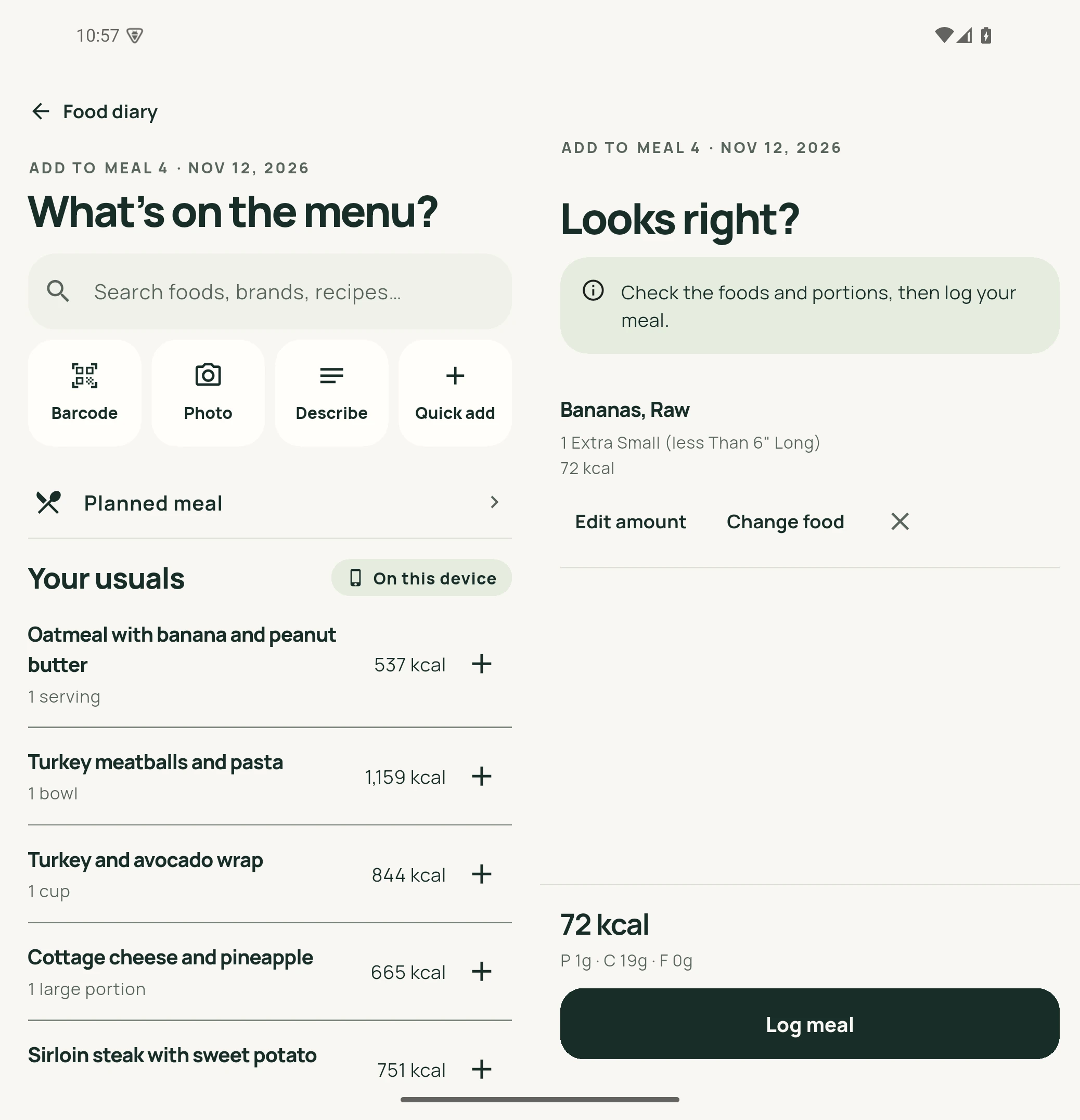
Food search on the left of a half-open foldable, with Bananas, Raw staged for review and Log meal on the right
Open wide · Side by side

Search and review at once.

Search for foods on the left while your meal and macro totals update live on the right — no jumping between screens to build a plate.

View full-size meal screenshot
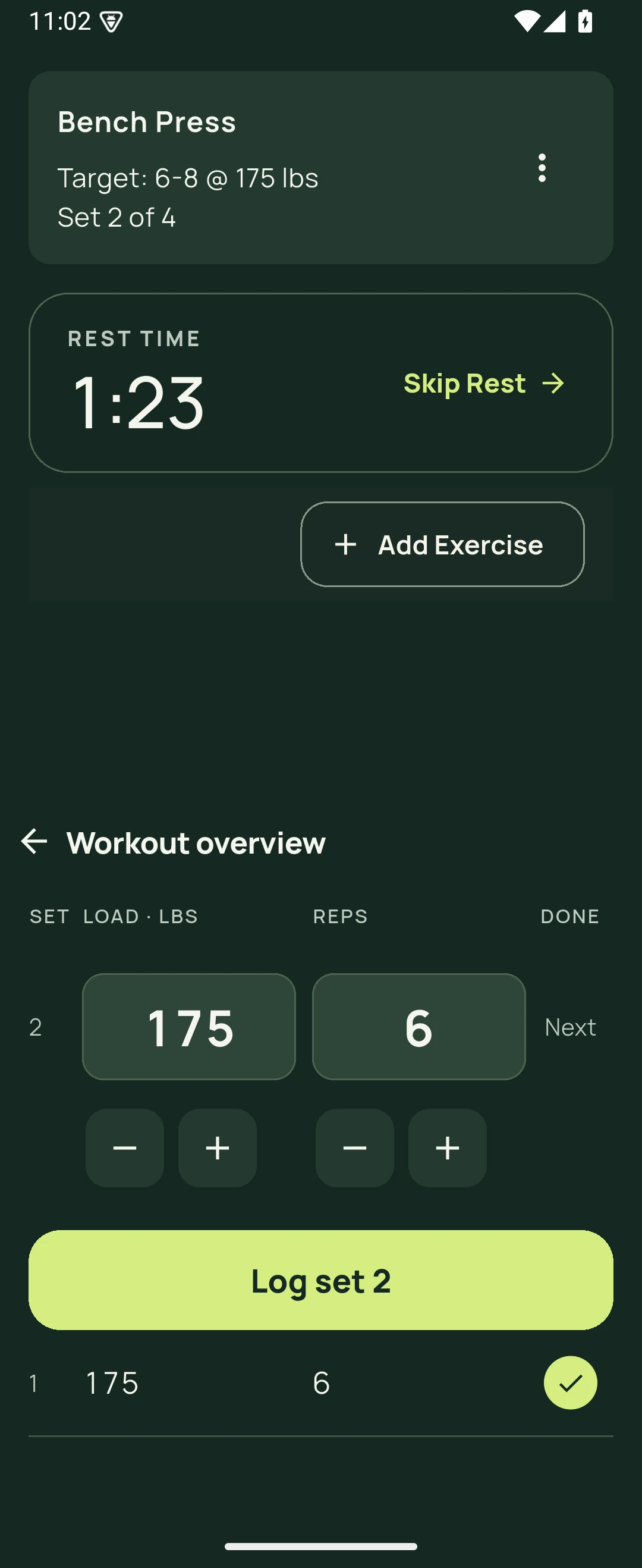
Half-open foldable in tabletop posture: Bench Press set 2 of 4 and the rest timer with Skip Rest above the fold, the weight and rep editor, Log set 2 and the logged first set below
Propped up like a laptop

Set it on the bench between sets.

Fold your phone halfway and set it down: your live rest timer stays upright on the top half where you can see it, while weight, reps, and Log Set sit flat on the bottom within easy reach.

View full-size workout screenshot

A voice that works for you

Coaching that speaks your language

Three AI coaching styles, shared practical guidance. Switch anytime; your plan carries over. More coaches and custom styles are available in the app.

Encouraging · Sam

Missed a logging day? “One day does not erase your progress. Start with your next meal.”
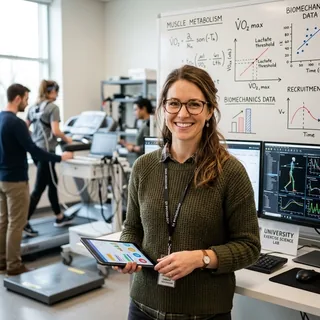
Explain the why · Eisley

Missed a logging day? “One missing day makes the trend less complete. Resume today; no need to compensate.”

Direct · Mark

Missed a logging day? “You missed a day. Log your next meal and choose one reminder for tomorrow.”

Make room for real life

A little more support,
where you need it.

GLP-1 companion mode

Protein-first targets, a medication dose diary, and appetite-aware coaching built around smaller meals.

Fasting windows

A simple timer between meals — no targets enforced, it just keeps track.

Refeed days

Scheduled higher-calorie break days that your coach plans around, not against.

Daily habits

Water goal, steps, weigh-ins, and food-log streaks — checked off automatically where possible.

Custom foods & recipes

Build your own foods with exact portions when the database doesn't have grandma's chili.

Planned meals

Sketch tomorrow's food tonight, then log the day in two taps.

Set targets by hand

Already know your numbers? Enter your own daily calories and macros directly, with or without a coached plan.

Health app sync

Read steps, workouts, weight, and sleep from Apple Health or Health Connect. Write weight, body fat, and nutrition back with your permission.

Well-being mode

Hide the scale and body metrics entirely; your coach shifts to habits and training.

34 language options

Choose the language used for the interface, weekly review, and coach, including regional options for Portuguese and Chinese.

Share cards

Turn a finished workout or a hit-your-macros day into a clean shareable image.

Your data, exportable

It's your history. Take it with you anytime.

Your device. Your data.

Personal stays personal.

Your logs and AI coaching are processed on your device. No Macro Trainer account is required. Optional backups save your data and photos to storage you choose — see our privacy policy.

Try it. Own it.

Buy it once. Keep going.

$59.99once.

Every feature is free for 14 days on iPhone, iPad, Android, Mac and Windows. After that it's one payment, with no subscription and no ads. Linux is free.

Start your stronger everyday

At home on your device.

Available on iPhone, iPad, Android, Mac, Windows, and Linux.

Macro Trainer on a Mac: sidebar navigation, Today with 1,463 kcal left and a Log food button, today's Upper Body session, water and sleep check-ins and the week 10 review

iPhone, iPad & Mac

One purchase covers all three.

Android

Phones and tablets.

Windows

Windows 10 and 11 (x64 and ARM64), from the Microsoft Store.

Linux

DEB, RPM, AppImage, Flatpak, Snap. Free.

Before you get started

Good questions.
Straight answers.

What happens after the 14 days?

On iPhone, iPad, Android, Mac, and Windows, new logging and coaching wait behind the one-time purchase. Everything you already logged stays readable. It's your data.

I bought it on my iPhone. Does that cover my Android tablet?

The purchase lives with your store account, so an App Store purchase covers iPhone, iPad, and Mac, a Google Play purchase covers Android, and a Microsoft Store purchase covers Windows. It doesn't cross between stores — that's how the stores work, not a stance we're taking. If you've bought it once and need it on the other side, email [email protected] with your receipt and we'll send you a code.

I bought Macro Trainer before the trial existed.

It stays yours. The app recognizes earlier purchases automatically. If yours slips through — a fresh install with no backup can — email [email protected] and we'll fix it the same day.

Is the Linux version really free?

Yes. There's no trial and nothing to buy on Linux. Install instructions are here.

A stronger everyday.

Your next step
starts here.

The first 14 days are free on iPhone, iPad, Android, Mac and Windows, and after that you pay once. Linux is free.